


Reverse Engineering Apps With AI: The Setup That Works Now
By Stefan @ WeDoTech
AI agents can now pull apart software and help you build your own version. Here is the current way to set it up, and where the legal line sits.
Buying stopped meaning owning a long time ago. Now AI-assisted reverse engineering is making people ask whether building means owning instead.
Over the past few weeks, a free tool called REA, short for Reverse Engineer Anything, has taken over tech feeds. It plugs into AI coding agents like Claude Code and Codex and brings reverse engineering to anyone who can type a prompt. Alongside it, developers have released free, AI-built look-alikes of Adobe and Microsoft apps, and software companies are clearly nervous.
A lot of the early tutorials are already out of date, and many skip the legal risks entirely. This is the updated version: what REA actually is, how to set it up properly today, and how to build your own tools without walking into a lawsuit. One important note before we start: we are not lawyers, and nothing here is legal advice.
The Week Reverse Engineering Went Viral
Two separate stories got mashed together online, so it is worth pulling them apart.
The first is REA itself. It is an open-source, MIT-licensed MCP server, which is a standard way of plugging tools into AI agents. It connects agents such as Claude Code, Codex, Cursor and Gemini CLI to professional reverse engineering tools. It went viral in October, racking up a huge number of GitHub stars in a matter of days.
The second is ArtCraft, an open-source suite of Adobe-style apps built by developer Brandon Thomas using Claude Opus 5.5. He announced free Rust rebuilds of Adobe apps in early October, then followed with Word, Excel and PowerPoint equivalents. His stated motivation was frustration with Adobe’s cancellation fees, a sore point that led Adobe to agree to a $150 million settlement with the US government in March 2026. Thomas describes his apps as clean-room projects built from public file format specifications rather than Adobe’s code. That claim has not been independently verified, and the apps themselves are still a work in progress.
The key point: ArtCraft was not built with REA. The two are linked by headlines, not by code.
What REA Actually Does
There is no magic new technology here. Reverse engineering has been around for decades, and that is part of what makes this interesting. The tools themselves are old. IDA dates back to the early 1990s, and Ghidra was released for free by the NSA in 2019.
What REA adds is a bridge. Instead of a human spending days reading decompiled output, your AI agent drives tools like Ghidra, Hopper and IDA, plus Chrome DevTools for web and Electron apps. It can inspect native binaries, JavaScript and Electron apps, .NET programs, Android APKs, databases, firmware and websites. It then reports back with evidence: pseudocode, strings, symbols and how parts of the app connect.
The project is upfront that results may be incomplete or incorrect. Complex software still needs a human to review what the agent finds. In other words, REA speeds up reverse engineering research. It does not replace a skilled reverse engineer.
The Setup That Works Now
Many viral videos say you can simply ask your AI to install REA. That is not the reliable route anymore. Fake copies of the project appeared while it was trending, and at least one offered a Windows download that turned out to be a trojan. Use the official installer instead.
- Install Node.js: REA needs a recent release of Node.js 22, 24 or 26, along with npm.
- Use the official package only: the official sources are the morluto/rea GitHub repository, rea.tools and the rea-agents npm package.
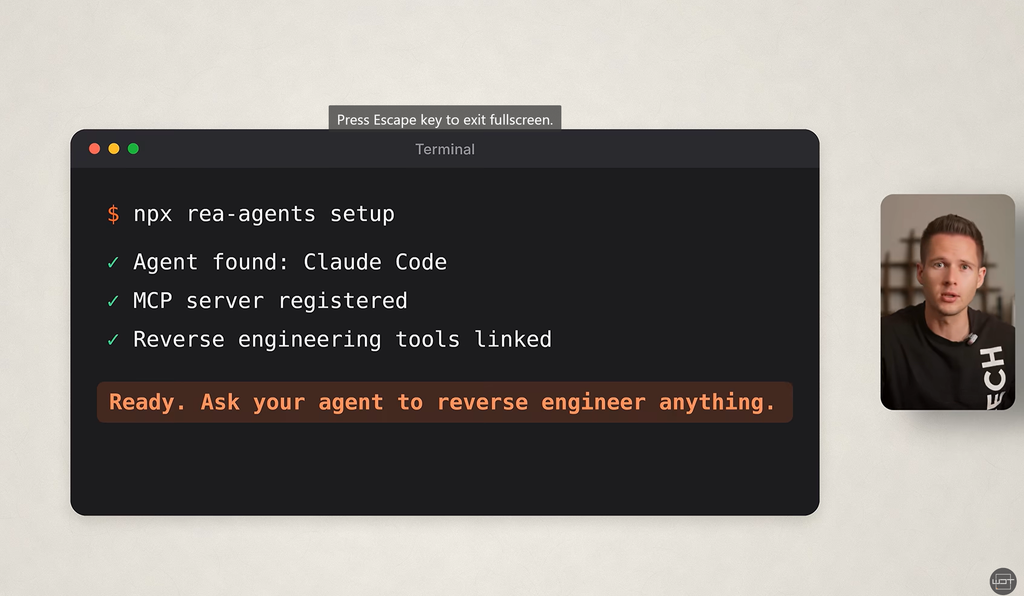
- Run the setup command: in a terminal, run
npx rea-agents setup. - Choose your agents: pick Claude Code, Codex, Cursor or another supported agent, review the configuration changes it proposes and approve them. Your existing settings are backed up.
- Restart your agent so it picks up the new tools.
- Add an analysis engine if you need one: JavaScript, Electron and .NET apps work without extra software. Deeper analysis of native apps needs Ghidra (free), or Hopper or IDA (both commercial, and they must be properly licensed).
- Check that it works: install the optional command-line tool with
npm install --global rea-agents, then runrea --help. - Keep it updated: run
npx rea-agents@latest setupto update.
Two habits make a big difference when you start reverse engineering with an agent. First, ask specific questions. “How does this app sync notes?” gets a useful, traceable answer, while “reverse engineer this app” does not. Second, start with an app you own or wrote yourself, and run anything untrusted inside a virtual machine, because some analysis actually runs the target program.

How to Build Your Own Version Safely
This is where most tutorials go wrong. One popular claim is that you can copy an app’s code and simply have the AI rearrange it so it looks different. That is not a safe loophole. If your new code is derived from decompiled proprietary code, rewording it does not make it yours.
The safer approach follows the idea behind clean-room design: copyright protects code, assets and distinctive design, not ideas or features. So build from features, not from someone else’s code.
Start by writing a plain-language description of what you want your app to do, in your own words. Then open a fresh project and have your AI agent build from that description alone. Do not paste in decompiled code, and use your own icons, names and visual design. PCWorld recently pointed out that telling an AI to clone a specific named app, or feeding it screenshots of one, can increase your legal risk. Describing the functionality generically is safer.
Here is the surprising part: for many personal tools, you do not need REA at all. Want your own notes app with drawing, checklists and file attachments? Describe those features and let your agent build it from scratch. Reverse engineering with REA earns its place when you need to understand how something works, for example to make your own app compatible with a file format or to study software you are authorized to examine.
Where the Hype Gets Ahead of Itself
Reverse engineering is legal in some situations, but it is not a free-for-all.
Most commercial software licenses, including Adobe’s, prohibit reverse engineering outright. US courts have treated reverse engineering for compatibility as fair use, but no court has yet ruled on AI agents doing it at scale. In the EU, reverse engineering a product you bought is generally allowed, but the code itself remains protected. Software vendors are also updating their terms to specifically ban AI-assisted reverse engineering.
REA’s own disclaimer says it is meant for lawful research, education, interoperability, software preservation and software you own or are authorized to examine. It explicitly excludes cracking licenses, bypassing DRM or anti-cheat, and copying proprietary code or assets.
The legal risk climbs sharply once you share or sell what you build. Using a feature-inspired tool privately is one thing. Publishing a copycat of a commercial product is another, and big companies have the money to make your life difficult even if they would not win in court.
There is also a quality reality check. A clone that looks right is not the same as a reliable professional tool. The ArtCraft maintainers themselves estimate their video apps are only about 56% ready for real work. And popularity is not proof of value. A chart of GitHub stars shooting upward tells you people are curious, not that the tool replaces Photoshop.
Finally, there are real people behind every app that reverse engineering can now imitate. Developers put years into their work, and it is fair to feel uneasy when that work can be copied in an afternoon.
AI-Built Apps vs Paying for the Subscription
- Cost: AI-built tools cost your time and AI usage fees, while subscriptions cost a monthly fee forever.
- Ownership: you own what you build from scratch, while a subscription disappears when you stop paying.
- Reliability: commercial apps win on polish, support and stability for professional work.
- Compatibility: commercial apps open industry-standard files perfectly, while home-built tools may struggle.
- Legal risk: building from your own feature list carries far less risk for personal use, while copying code, assets or design, or reverse engineering software you are not authorized to examine, is high risk.
Our verdict: for simple personal tools, building your own with AI is now a realistic option and a healthy pressure on subscription pricing. For professional work, client files and anything you plan to sell, the established software still makes sense.
Final Thoughts
AI-assisted reverse engineering is a big moment, but not in the way most viral videos claim. REA is a powerful reverse engineering research tool, and AI agents can now build surprisingly capable apps from a good description. That combination forces subscription companies to earn their monthly fees rather than rely on lock-in, and that is good for everyone.
But “any app for free” is not the reality. The method that works today is simple: install REA from the official source, use it to understand software you are allowed to examine, and build your own tools from your own feature list, not from someone else’s code. Do that, and you get most of the benefits with far less risk.
If this debate about what you really own sounds familiar, read our take in GTA 6 Has No Disc. The Anger Is Not About the Disc.